Nano Banana 2.5 and the Changing Landscape of AI Image Creation
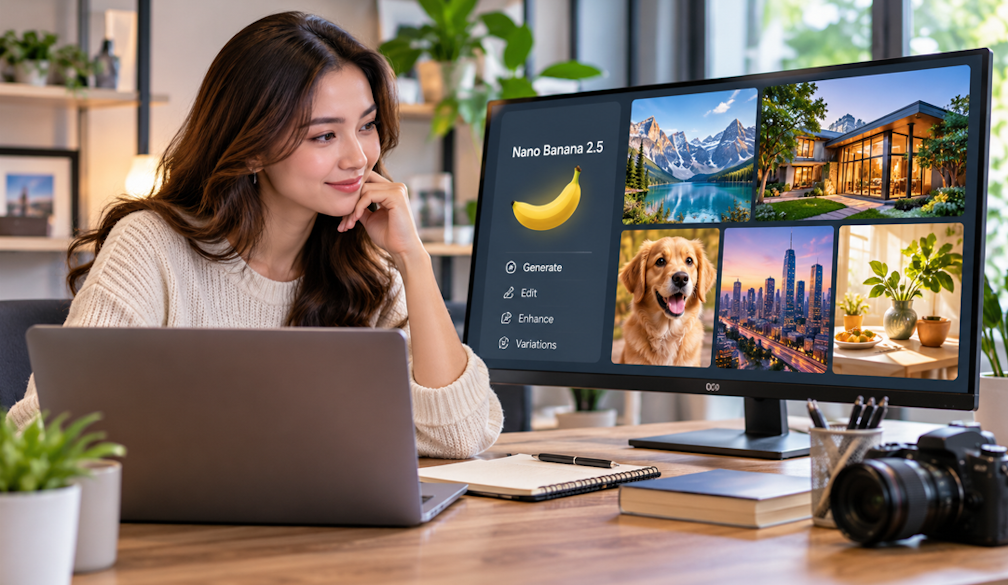
Let's be honest. AI has totally changed how people make digital images. You don't have to start with a blank canvas anymore. Or build every little piece by hand. Now you just describe your idea in plain, everyday words. And boom, you've got a visual starting point. That shift made image generation useful for way more than designers, too. Educators, marketers, content creators. Storytellers. Regular everyday users, even.
One name that keeps popping up here? Nano Banana 2.5. The term's tied to Google's Nano Banana image-model family. Other creative platforms offer their own image-generation and editing workflows, though. Built around similar prompt-based tech. So here's the thing. Knowing how these systems actually work matters way more. More than obsessing over one model's name, anyway.
What Is Nano Banana 2.5?
So what's Nano Banana 2.5, really? Think of it as part of a bigger group. AI models that create or change images using natural-language instructions. You don't have to tweak every visual setting yourself. Nope. These systems read your description. Then they try to produce an image that fits. The subject, the style. The composition and the context.
Say you describe a modern café at sunset. You want warm lighting. Wooden furniture. Some indoor plants. And a certain camera angle. An AI image model can read all that. Then it cranks out a visual version of it.
Here's what makes it interesting, though. Modern image systems are mixing creation and editing more and more. You can start with a generated image. Then just ask for changes. No starting over from scratch. Pretty handy, right?
How Prompt-Based Image Generation Works
It all starts with a prompt. Easy. A prompt's just a written description. It tells the system what you want to see.
A good prompt can include a few pieces:
- Subject: What should appear in the image?
- Environment: Where is the subject located?
- Composition: How should objects be arranged?
- Lighting: Should the scene be bright, dramatic, soft, or cinematic?
- Style: Should the result look photographic, illustrated, painterly, or three-dimensional?
- Text: If the image contains wording, what should it say and where should it appear?
The clearer you describe these, the better. It gets way easier to show the look you're going for. But super long prompts? Not automatically better. Not even close. Clear instructions with a logical flow usually win. They're much easier to tweak later, too.
Image-to-Image Editing Adds More Control
Text-to-image is only one piece of the puzzle. Image-to-image workflows let you bring your own picture. Could be a sketch. A product photo. Or some other reference. Then you just describe what you'd like changed.
Say you upload a product photo. You ask for a new background. But you want the product's shape and key details left alone. Easy enough. Someone else might upload a portrait. Then ask for a different art style. Or a whole new setting.
This reference-based approach really shines when consistency matters. You don't have to describe every visual detail from zero. The original image does a lot of the heavy lifting. It's the foundation for the change.
So platforms like Nano Banana 2.5 fit into a bigger world. A whole ecosystem of AI-assisted image creation and editing tools. Oh, and one important thing. A platform offering related creative workflows isn't necessarily the one that built the model underneath. Big difference.
Where AI Image Generation Can Be Used
AI imagery is useful in tons of areas of digital content.
Social Media Content
Creators can come up with concepts for all kinds of formats. Square posts. Vertical stories. Thumbnails. Other social-media stuff, too. AI helps you test different layouts fast. Before you lock in a final design.
Advertising and Product Concepts
Businesses can picture possible product scenes. Packaging ideas. Promo layouts. Ad concepts, too. All before spending money on traditional photography or design work. Smart, right?
Education and Presentations
Teachers and students can use generated visuals to explain abstract ideas. Or make presentation graphics. Or create visual examples that'd be tough to photograph. Or just hard to find.
Storytelling and Creative Projects
Writers, filmmakers, and artists can play around with characters and environments. Storyboards and scene ideas, too. Trying lots of variations helps a ton. You land on a consistent visual direction before production even starts.
Why Text Inside Images Still Requires Attention
Here's where it gets tricky. Readable text has always been a weak spot for AI graphics. A model might make a gorgeous poster. Then mess up the letters. Or space things awkwardly. Or just misspell words. Annoying, right?
So text-heavy designs need a careful look. Don't just trust it and move on, though. Posters, ads, packaging concepts. Logos and infographics, too. These usually need extra editing after they're generated.
A good habit? Spell out the exact wording in your prompt. Plus the hierarchy, the placement. And how important the text should look. Then check the result before publishing. Every time.
Choosing the Right Workflow
Different projects need different approaches. Starting an idea from nothing? Text-to-image is probably your natural first move. Got an existing photo or composition that needs changes? Image-to-image editing might give you more control.
Where the visual's headed should shape your process, too. A mobile story needs different dimensions than a presentation slide. Different composition, too. Same goes for a website banner. Or a printed poster.
So think about a few things right from the start. Aspect ratio and resolution. Safe margins. Where the subject sits. How much negative space you need. Don't leave these as stuff to fix at the end. Trust me, that's a pain.
The Importance of Human Review
AI image generation can speed up creative work a lot. But the results still need a human eye. Check faces and hands. Objects and text. Proportions. Cultural details, too. Anything that might hide sneaky little mistakes.
Then there's copyright and licensing. Privacy and consent, too. That's where it gets shady if you're not careful. Especially with reference images. Or visuals for commercial use. Just because an image can be generated doesn't mean every use is okay. Not automatically, anyway.
In the end, tools built around tech like Nano Banana 2.5 show a bigger shift. Digital creativity's changing. It's heading toward a mix of things. Natural-language instructions and reference images. Automated generation. And human polishing on top. Get to know each of these stages. You'll pick better workflows. And you'll make visual content you can actually rely on.

 Emma Fawcett, CEO of Compare Club